Reporting Permissions

Service Manager supports a Delegation Model for different User Roles. However, if you want non-Administrators to see and use specific Reports, this is not possible using one of the default roles. To achieve this goal, you have to dig a little deeper and use the permissions model of the SQL Reporting Services.
Continue reading

Posted in SCSM | Tagged , , , , , | 6 Comments

Make Service Manager Customer-aware

Out-of-the-box, Service Manager cannot be used to manage multiple customers – e.g. there is no customer field/attribute when you create a new incident. Without this information it is very difficult to see which customer reported a specific incident. If you want to make this information visible, you have to do some customization.

Continue reading

Posted in SCSM | Tagged , , , , | 33 Comments

Mobile Devices and SIM Cards

Some customers want to manage Mobile Devices. Unfortunately, no such classes exists out of the box in Service Manager. Therefore you have to create your own classes as well as build the relationships between those. In this article i will show how easy it is to use the default relationship that exists between Configuration Items. Sure, you could create your own relationships and I will show you how to this in a later post, but now I will just show how easy it is to use the default relationship.

Continue reading

Posted in SCSM | Tagged , , , | 2 Comments

Service Manager Workflows – Part 1

To automate tasks, Service Manager brings it’s own Workflow Engine. Using the Authoring Tool you can build detailed Workflows to automate almost any task you want. And the best thing: it’s pretty easy! In this Blogpost Series i will show you how Workflows can make your life easier …

Continue reading

Posted in SCSM | Tagged , , , , , | 8 Comments

Auto-Close resolved Incidents

After a Ticket has been closed, it is no more possible to reopen it – this is why the “resolved” state exists. As long as a ticket is resolved, it can be re-opened. So one thing you have to deal with when using Service Manager for Incident and Problem Management is constantly closing Incidents and Problems when they have been in a resolved state for a while. Many customers want to automate this process. Therefore I have written a simple PowerShell-Script that can be used for exact this need.

Continue reading

Posted in SCSM | Tagged , , , , , , , | 25 Comments

Adding a custom field to Incident Forms

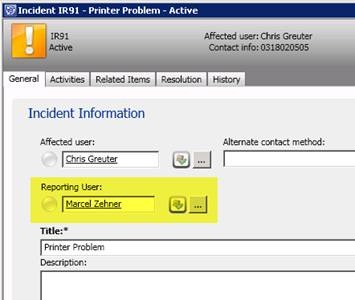
Today I had an interesting Request. A Customer came with the idea of adding an additional field to the Incident Form. It should hold the User that would report the Incident. Often the user reporting the Incident is not the one that has problems (e.g. when a Power User of a Branch Office reports Incidents for all Branch Office Users). If you want to keep information about the Reporting User and the Affected User, this guide shows you how. This is how the Solution would look like:

clip_image002

Update: See my Video about extending Classes and Incident forms here.

Continue reading

Posted in SCSM | Tagged , , , , , , | 82 Comments

Automated Change Requests using Microsoft Opalis

If you want to automate certain processes, then Microsoft Opalis is the way to go. With this Orchestration and Workflow engine it possible to automate cross-silo processes without writing a single line of code. of course, if you have special requirements, it is still needed to code, but out of the box you get as many as 40 integration packs to different products and technologies (not only microsoft!) that makes the building process of your workflows as easy as possible. In this example I will show how easy it is to automate a Server Reboot process by first creating a Change Request in Service Manager with automatic completion.

Continue reading

Posted in SCSM | Tagged , , , | 1 Comment

CSV Import of Objects

Sometimes it is necessary to import a bunch of objects at the same time, for instance when you create a new custom class for managing objects that only live in Service Manager and cannot be imported by using connectors. For this case the CSV-Import is exactly what you are looking for. The process is straightforward.

Continue reading

Posted in SCSM | Tagged , , | 9 Comments

Custom Icons for Views and Folders

When you create your own Views and Folders, Service Manager uses Default Icons. This is fine, but for a better presentation and recognition of views it makes sense to use custom Icons – especially when you have created custom Classes for managing objects. For this we have to dig a little deeper into the XML-Structure of the Management Pack.

Continue reading

Posted in SCSM | Tagged , , | 11 Comments

Relations between Objects

Sometimes it can be useful to group different objects together. One requirement could be, to group a Computer, a Monitor and a Printer Object together to form a Workplace Object. This could be useful to easily recognize which objects belong to a specific workplace. This example uses an Object Class “Monitor” to group Monitors together with Computers and Printers.

Continue reading

Posted in SCSM | Tagged , , , , , , | 11 Comments