Quick Info: Exchange Connector 3.0 is now RTM and finally supported!

We had to go a long way, but now it’s finally here: the Exchange Connector 3.0 for Service Manager is now RTM and officially supported by Microsoft. You can download it from here –> http://www.microsoft.com/en-us/download/details.aspx?id=38791

Cheers
Marcel

Posted in SCSM | Tagged , , , , | Leave a comment

PDT – Install System Center in 1 (one) hour

If you are a Microsoft System Center enthusiast like me, then you are faced with the challenge to install all those products over and over again. Well, when using the PowerShell Deployment Toolkit this gets a bit easier because it helps you to deploy the complete suite in one hour – wow! I will post some additional information on how to use the PDT later on this blog. For now, enjoy this video (not recorded by me) or get more information here –> http://blogs.technet.com/b/privatecloud/archive/2013/02/08/deployment-introducing-powershell-deployment-toolkit.aspx

Cheers
Marcel

PowerShell Deployment Toolkit in Action
Posted in System Center (without SCSM) | Tagged , , , , , | Leave a comment

Another Intake Form – less pain in this (Service Manager) world

Service Desk employees are often faced with the situation that they do not know if the user that is calling is reporting an incident or has a request for service. By using a good questioning technique he can try to find out what the caller really wants and can then open the correct ticket. But until it is clear what the caller really needs or wants, no ticket can be opened because the decision if it will be an Incident Request or a Service Request must be made first. There is no out of the box “conversion” if the ticket afterwards. So how to deal with that?

Continue reading

Posted in SCSM | Tagged , , , , , , | 2 Comments

MVP 2013 “System Center Cloud and Datacenter Management” – #MVP #MVPBuzz rocks!

Today I received one of the most important Mails of the year Smiley My MVP Status was renewed for another year!

MVP_small

The MVP program allows you to get in touch with lots of specialists, enthusiasts and geeks, some of them becoming good friends over time. I really enjoy to be part of this family and am looking forward for an other exciting year!

Cheers
Marcel

Posted in Exams/Awards | Tagged , | 1 Comment

“How to create HP ProLiant objects manually in the CMDB”

Many of my customers start their Service Manager implementation by implementing Configuration Management first. This indeed makes sense, because as soon as objects and relationships are available in the CMDB and under change control, they know what’s going on behind the scenes and get the needed transparency for the infrastructure and their services. And of course they have an excellent base for supporting their processes, e.g. Change Management, Incident Management or Request Fulfillment. The big question here is how all these objects and relations are brought to the CMDB. Well, we all know that one cool thing about Service Manager is the fact that we have different connectors available to easily bring objects from ADDS, SCCM or SCOM to the CMDB.

The HP ProLiant Management Pack for SCOM discovers physical ProLiant Servers and monitors them. By using the SCOM connector in SCSM you have all those Servers in the CMDB within minutes. But I often face customers that either do not have all ProLiant Server monitored by SCOM or are running older ProLiant Server for ESX (why ever …) that are not discovered. One thing you might think of is “Hey easy, I just create these ProLiant CIs manually in the Service Manager console”. Good thought, but impossible.

Continue reading

Posted in SCSM | Tagged , , , , , | Leave a comment

Adding an ID or auto incrementing property to default classes

We have lots of Service Manager customers that have comprehensive CMDBs where they store all kind of object types and relationships. When defining your very own classes you know that every class should have a key property. Often this is property is called something like “ID” and will contain an auto incrementing value, e.g. “Car1”, “Car2” etc. so that you don’t have to take care about setting a unique value for every instance. Default classes also have key properties, but not always a real ID. The windows computer class uses the computer principal name as a key property. This can be confusing when you re-install computers or re-use computer names – this is especially confusing when accounting comes into play. So why not having an auto incrementing ID property there too to uniquely identify assets over time?

Continue reading

Posted in SCSM | Tagged , , , , , , | Leave a comment

Documentation of SCSM Relationship Classes

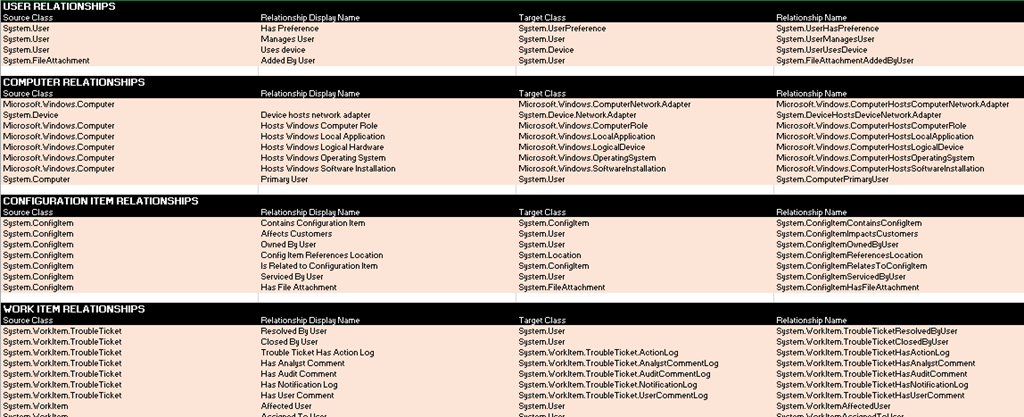
When you are dealing with Service Manager or especially CMDB’s you know that it’s all about relationships. Service Manager delivers tons of different relationships between object classes that will help you to build the relationships to reflect your needs. Of course, most of the time these relationships are not enough and you need to add many additional relationships on your own. But you must know what relationships exist out of the box, what classes they relate together and how they work.

To make things easier I put together an excel spreadsheet that lists the most important (not all) relationships in Service Manager together with the following information:

  • Relationship Display Name and Internal Name
  • Source Class
  • Destination Class
  • Relationship Type
  • Management Pack information where the Relationship lives

Capture

You can download the file from my SkyDrive. Maybe I will update the spreadsheet over time. If not, feel free to download and update it on your own Smiley

Cheers
Marcel

Posted in SCSM | Tagged , , , | 17 Comments

Linking Parent/Child Incidents together using Orchestrator

“How can I use SCORCH to link Parent Incidents with Child Incidents?” seems to be a common question that I get a lot. So I decided to write a quick post on this topic. In this example I will use two Incidents that will be linked together, but you can of course modify this basic procedure for your own need. The only requirements are that you have SCSM and SCORCH up and running together with the SCSM Integration Pack.

Continue reading

Posted in SCSM | Tagged , | 1 Comment

Marcel@MVP Summit 2013

In two weeks I will attend the MVP Global Summit 2013 in Redmond and Bellevue/USA. For this event, Microsoft invites all MVPs worldwide (approx 4000) for a great week of learning, sharing and having fun! For me it’s a great opportunity to meet people that I’m connected with from all over the world in person. More information available here –> http://www.2013mvpsummit.com/.

Starting now, I accept orders for famous swiss chocolate Smiley

Cheers
Marcel

Posted in Events/Speaking | Tagged , , , , | 4 Comments

Installing the SCSM SSP – Error executing Custom Action “CreateSharePointWebSite.F175D191_81C3_4A7D_A05B_6A250575B468”

I had this error today while installing a new SCSM SSP Server in my lab. At the end it was a pretty simple thing to fix, but it cost me some time to figure it out. Just wanted to share with you in case you run into the same thing.

Continue reading

Posted in SCSM | Tagged , , , , , | 3 Comments