Strong name key files for sealing your MPs … hmmmm?!

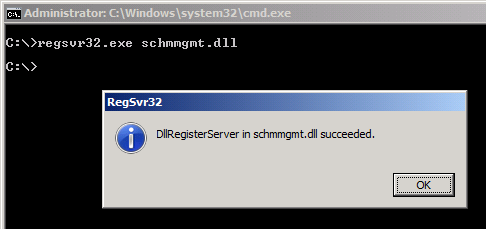
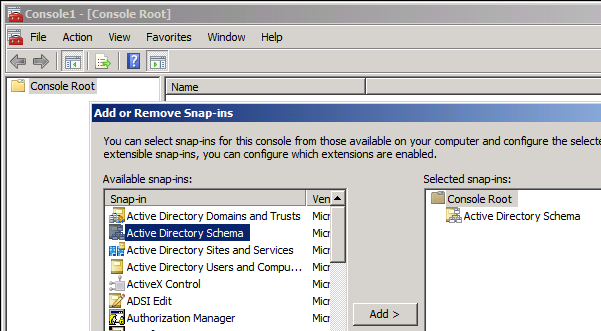
You may have heard that sealing Management Packs (MPs) is a good practice. This is definitely the case when you have MPs that contain classes, class extensions etc. because you can reference to those classes from other MPs. Referencing is only allowed when the target class lives in a sealed MP. To seal a MP you need a strong name key file. And you must know some other things. Read on to learn more …
Continue reading

Posted in SCSM | Tagged , , , , , , , , , , , | 2 Comments

Dealing with multiple Management Servers 1/3: Install an additional Management Server

Having more than one Management Server offers a lot of benefits. Therefore I decided to write a series of blog posts that demonstrate how to install and use, load balance and decommission Service Manager Management Servers.

Continue reading

Posted in SCSM | Tagged , , , , , , | 18 Comments

Service Manager Management Group Documentation

Wow, that was a long time without blogging. The reason why is that I have tons of System Center projects to work on and my time is somehow vanishing. But now be prepared for a series of new posts on Service Manager 2012! This time with a nice script to document your Service Manager Management Group. Stefan Roth, SCOM Expert at itnetx Switzerland has released a cool MP to document SCOM Management Groups. I adapted the base script for Service Manager. This now lets you document some important parts of the MG configuration.

Continue reading

Posted in SCSM | Tagged , , , , | 3 Comments

More transparency in SLO Management by reusing the “Target Resolution Time” field

SM12 has a great feature for Service Level Management. I will not go into any details because this was already described here or here. With SM12 you are very flexible to deal with different service levels, metrics and also time zones. In the background things happen different from SM10 as now an object of type “Service Level Instance Time Information” is created for every new SLO that applies to an Incident. This object is then referenced to the incident. One Incident can have multiple SLOs applied, for instance one because an Incident is a Priority 5 Incident, and another one because the affected User is a VIP User. The downside of this approach is that handling the “target end date” of incidents is a bit more complex because you always have to use the relationships and then find out what the effective target end time is. This blog post shows how this can be made a little bit easier.

Continue reading

Posted in SCSM, System Center (without SCSM) | Tagged , , , , , | 50 Comments

Import additional properties of ADDS Users to the CMDB

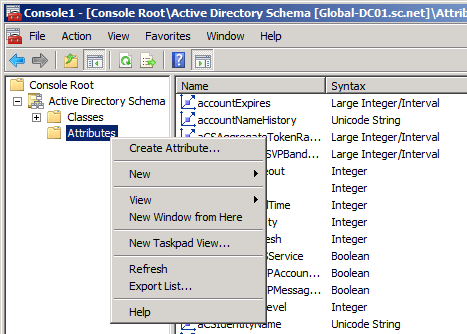
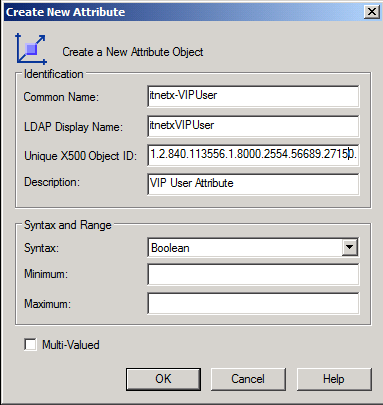
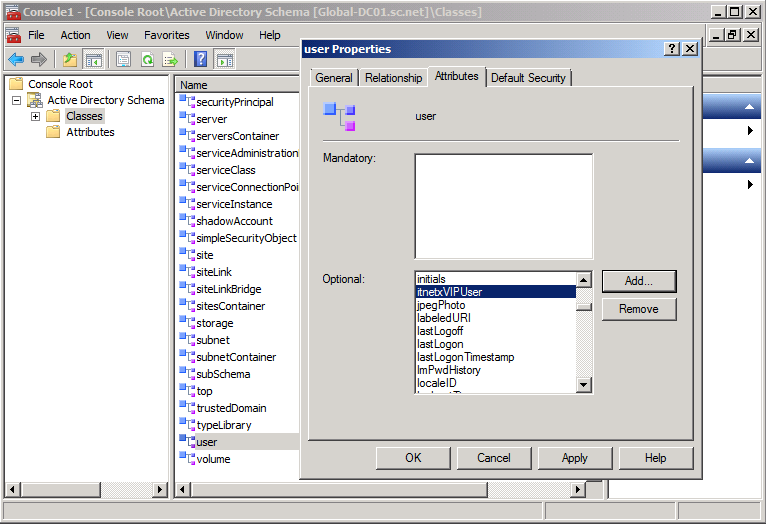
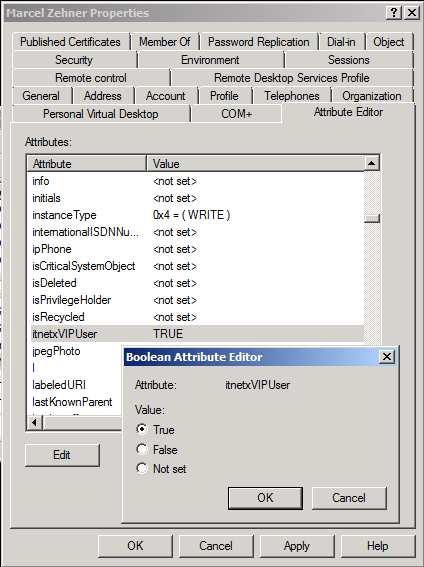
Step 1 – Prepare VIP User attribute in ADDS

image

image

image

image

If you need more information about OIDs check out this link –> http://msdn.microsoft.com/en-us/library/windows/desktop/ms677620(v=vs.85).aspx

image

image

Step 2 – Sync VIP User attribute to CMDB

Install ADDS Powershell Module on Runbook Servers

Posted in SCSM, System Center (without SCSM) | 2 Comments

Error when installing SCSM12 and SCO12

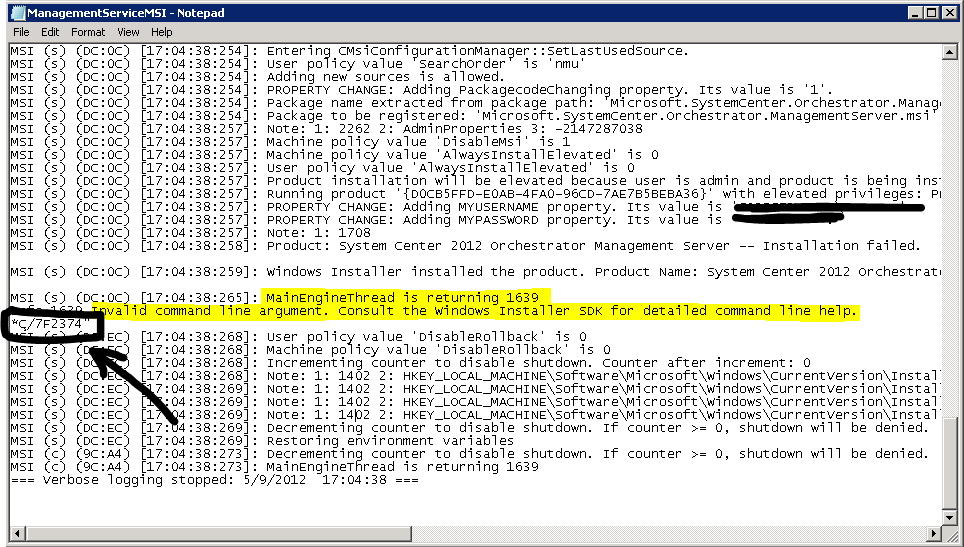
Today I ran into a problem when installing some new Private Cloud components for a customer. When installing SC Orchestrator 2012 and SC Service Manager 2012, after going through the wizard, I immediately got an MSI error with ID 1639 “Invalid Command Line Argument”. After taking a closer look at the installation log I found out why this was the case. This is the log of the Orchestrator Installation:

image

Take a look at the black marked area. There, the second part of the Orchestrator Service Account Password was logged in clear text! This lead me to the point: because the SC Orchestrator Service Account had a complex password with double quotation marks in it (the password was MFLI”*ç/7f2374), the Installation (MSI execution) definitely had a problem with interpreting this correctly. This is why the second part of the password was handled as a separate part of the command line execution and therefore failed. After changing the password to something else, the installation worked as expected.

Hope this saves you some time Smile

regards
Marcel

Posted in SCSM, System Center (without SCSM) | Tagged , , , , , | 5 Comments

It’s all about the Service

When talking about monitoring and management IT people tend to focus on infrastructure components like servers, network devices etc. This is indeed important, but even more interesting is to have an eye on your applications and services that are consumed by internal or external consumers. When services are not available your consumers will not be able to use them which can have a drawback on the company’s reputation and you can lose money. With System Center 2012 you can manage the complete life cycle of a service, from deployment to monitoring and management until decommissioning. In this blog post I will give you a high level overview how this could look like by using Microsoft System Center 2012 technologies.

Continue reading

Posted in SCSM, System Center (without SCSM) | Tagged , , , , , , , | 3 Comments

Download MMS Sessions

My fellow colleague Stefan Roth over at http://blog.scomfaq.ch published a cool PowerShell script that allows you to download all (or selected) wmv files recorded at Microsoft Management Summit 2012 for offline viewing. This is definitely a great time saver if you plan to download lots of content, so make sure you give it a shot –> http://blog.scomfaq.ch/2012/04/21/mms-2012-download-sessions-offline-viewing/

regards
Marcel

Posted in Events/Speaking | Tagged , , | 1 Comment

Private Cloud Exam 70/71-246 – my Experience

Today at MMS I took the Private Cloud exam 71-246 “Monitoring and Operating Private Cloud with System Center 2012”. This is one of the exams you need to pass to get the new “MCSE: Private Cloud” certification (Microsoft Certified Solutions Expert). Let me share my experience here.

Continue reading

Posted in Exams/Awards | Tagged , , , | 14 Comments

System Center 2012 Global Availability (RTM)

I’m attending MMS in Las Vegas these days. At today’s keynote (2 minutes ago) Brad Andersen announced the global availability of System Center 2012! This is pretty cool as you can now start designing and implementing all the cool things that you read about System Center 2012 over the last months. Many of our customers waited  a long time for this, now it’s reality Smile Start testing now and have fun playing around with System Center 2012!

regards
Marcel

Posted in SCSM, System Center (without SCSM) | Tagged , , , | 3 Comments