
Maybe you had this one before: after doing a fresh install of Service Manager or even after SCSM Reporting was already up and running, some or all of the reports lost the connection to their data source. Because I had this issue again this week, I decided to write a blog post on how to solve this.
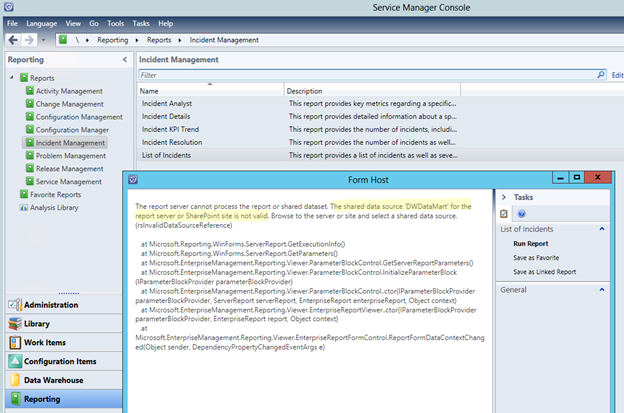
This is how the error looks like. When you run a Report in the SCSM Console an error message is displayed telling you that the Data Source is not valid.
When you connect to the SQL Reporting Server Website you will see that the Report lost the configured data source.

OK, this can be easily fixed by just browsing to the data source that exists on the server and reconnect the data source. But doing this for 30+ Reports is not very handy. Another way to solve this is executing a SQL script that does the work for you. Just run this script against the SQL ReportServer Database for SCSM.
USE [ReportServer]
GOUPDATE [dbo].[DataSource]
SET [Link] = (SELECT TOP 1 [ItemID] FROM [dbo].[Catalog] where name = [dbo].[DataSource].[Name])
WHERE name is not null and link is null
After the script was successfully executed, the reports are connected again.


Thanks to Raphael Koeppel – a SQL specialist of one of our customers – to share the script!
regards
Marcel




 marcelzehner.ch