
When Management Packs are imported, SCSM does some integrity checks to see if the Management Pack is valid. This indeed makes sense because you immediately know when your Management Pack has errors in the code. But there are also times when everything seems to be OK and import is successful, but the Management Pack behaves somehow strange that the Service Manager Console crashes immediately after starting – I had this again today and decided to make a short blog post about solving this problem.
The solution seems very easy: just remove the Management Pack from the Service Manager infrastructure. Correct, but today my console crashed after seconds every time I started it. It was just impossible to do anything. So I had to use another way to get rid of the faulty Management Pack – the famous Powershell smlets. The process is straightforward: import the smlets module, get the Management Pack you want to remove, pipe the command and remove the targeted Management Pack. After that, just start the Service Manager Console and it should again work as expected.
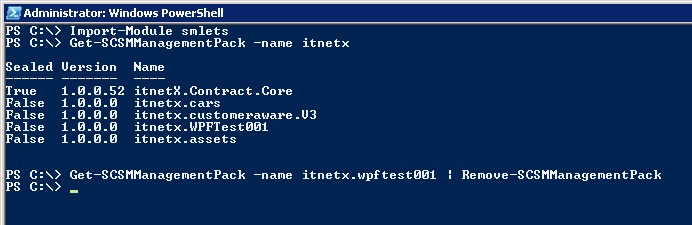
Important: Take care when using this approach because wrong targeting could lead to an unwanted removal of Management Packs and that could mean data loss!
regards
Marcel




 marcelzehner.ch
Pingback: System Center Service Manager information(blog) overview - System Center Service Manager
I Cannot remove Microsoft.Demo.IncidentSLAManagementPack.library.
It is a sealed MP. There error as following:
FullyQualifiedErrorId: System.InvalidOperatinException, SMLets.RemovemanagementPackCommand.
Hey
Management Packs sometimes have dependencies to other MPs. If this is the case, they cannot be removed until all dependent MPs are removed first. Check that in your case. An easy way to get that information is to use the Service Manager Console, show the properties of your MP and check if there are such dependencies.
regards
Marcel
Hey ,
I have a question.. Can we detect any dependent management packs using PowerShell?
Regards,
shiva G
Hey
Something like this should work (where “itnetx.rev” is the name of your MP):
(Get-SCSMManagementPack itnetx.rev).references
Cheers
Pingback: System Center Service Manager information(blog) overview … | The People Search System