
When using ARM templates you often end up with many lines of code. There are some gems available that help you reducing your code to a minimum (which normally is still a lot). If you need to create multiple instances of resources, there is a function available that helps you to achieve this goal with very few code. By using a simple ‘copy’ one can create multiple instances of a specific resource.In this example I want create five resource group by using the copy/count property. Of course, all instances need unique names, this is why I use the copyIndex() to generate the resource name. copyIndex represents the iteration number of the resource creation loop.
{
  "$schema":"https://schema.management.azure.com/schemas/2015-01-01/deploymentTemplate.json#",
  "contentVersion":"1.0.0.0",
  "parameters":{
    "location":{
      "type":"string",
      "defaultValue":"West Europe"
    }
  },
  "variables":{
  },
  "resources":[
    {
      "type":"Microsoft.Resources/resourceGroups",
      "apiVersion":"2018-05-01",
      "location":"[parameters('location')]",
      "name":"[concat('w-rgr-user',copyIndex())]",
      "copy": {
        "name" "resourcegroupcopy"
        "count": 5
      }
    }
  ],
  "outputs":{
  }
}
The result looks like this:
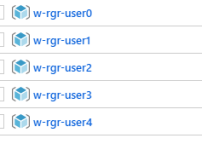
As the name is concatenated from the prefix ‘w-rgr-user’ and the copyIndex, you can see that the first iterations obviously has the iteration number 0. This can be changed by adding a copyIndex offset.
"name":"[concat('w-rgr-user',copyIndex(11))]",
This now starts the iteration counting with 11 and so the results now looks like this:
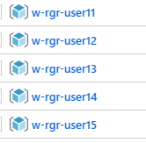
If you want to add more meaningful names this can also be done. For that, the template needs to be modified slighthly. Let’s say we want to include a personal name in the resource group name. For that I added a new parameter that holds all five names I need in an array of default values. To create the name I now need to iterate through the five names by using the copyIndex value (0-4) to access the values in the parameters array. 0 would be Marcel, 1 would be Alexa etc.
{
  "$schema":"https://schema.management.azure.com/schemas/2015-01-01/deploymentTemplate.json#",
  "contentVersion":"1.0.0.0",
  "parameters":{
    "location":{
      "type":"string",
      "defaultValue":"West Europe"
    },
    "resourceGroupNames": {
        "type": "array",
        "defaultValue": [
          "Marcel",
          "Alexa",
          "Siri",
          "Peter",
          "John"
      ]
    }
  },
  "variables":{
  },
  "resources":[
    {
      "type":"Microsoft.Resources/resourceGroups",
      "apiVersion":"2018-05-01",
      "location":"[parameters('location')]",
      "name":"[concat('w-rgr-', parameters('resourceGroupNames')[copyIndex()])]",
      "copy": {
        "name" "resourcegroupcopy"
        "count": 5
      }
    }
  ],
  "outputs":{
  }
}
Again, this is the results looks like.
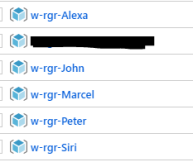
That’s it. Have fun!
Cheers,
Marcel




 marcelzehner.ch