
Today I ran into a problem when installing some new Private Cloud components for a customer. When installing SC Orchestrator 2012 and SC Service Manager 2012, after going through the wizard, I immediately got an MSI error with ID 1639 “Invalid Command Line Argument”. After taking a closer look at the installation log I found out why this was the case. This is the log of the Orchestrator Installation:
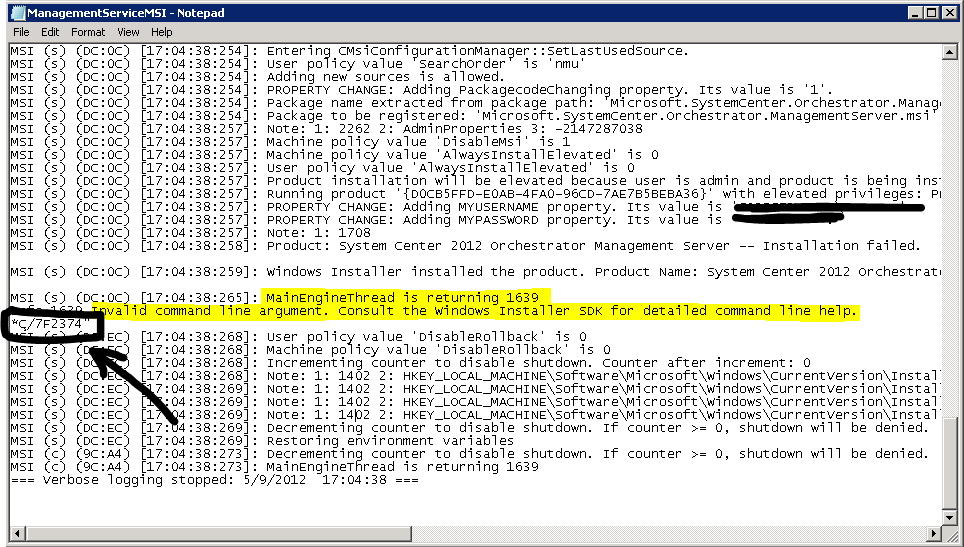
Take a look at the black marked area. There, the second part of the Orchestrator Service Account Password was logged in clear text! This lead me to the point: because the SC Orchestrator Service Account had a complex password with double quotation marks in it (the password was MFLI”*ç/7f2374), the Installation (MSI execution) definitely had a problem with interpreting this correctly. This is why the second part of the password was handled as a separate part of the command line execution and therefore failed. After changing the password to something else, the installation worked as expected.
Hope this saves you some time 
regards
Marcel




 marcelzehner.ch
So it wasn’t just me going mad!!
I had the same problem a couple of days ago:
http://systemscentre.blogspot.co.uk/2012/05/orchestrator-install-problem.html
At least you had a clue in your log, mine simply said C:\Program 😦
Regards,
Steve
I have a question :
The revised new SC 2012 suit bundled with 8 different products . For license compliance , all products neeed to be installed within one physical server ( if I choose to adopt all the features of SC2012)
In your professional opinon , do you think it is feasible to install all these products in one server , not to mention the MS SQL in addtion ?
Or Microsoft Licensing Team live in fantasy ?
Hey
You don’t need to (and also should not) install all products on a single server. This is not a requirement from a licensing perspective and also would not make much sense.
regards
Marcel
Hi Marcel !
Got the same error during seperate Installation of the Web Content Server (SC2012 SP1)
The reason in this case was a custom SSL certificate. Using the Default Server certificate worked.
Your article lead me in the right direction – Thanks – Roman
Hey
Thanks for sharing Roman!
Cheers
Marcel